





Also known as
 @ groby

var socket = new WebSocket("ws://server.com");

socket.onopen = function(event) {
socket.send("Hello Server"); }

socket.onmessage = function(event) {
alert("Server says: " + event.data); }

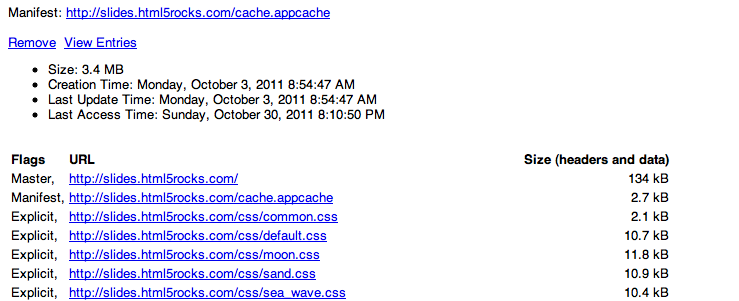
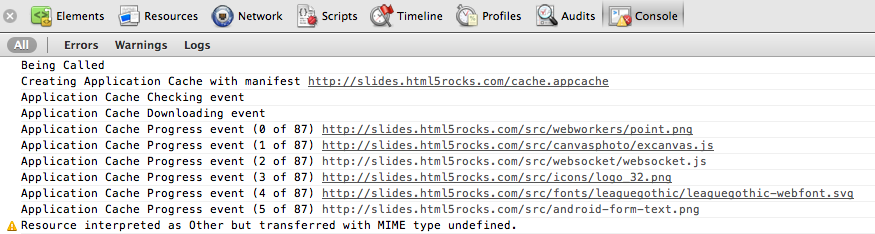
<html manifest="example.appcache">... </html>
Serve with mime-type: text/cache-manifest
CACHE MANIFEST
# 2010-11-17-v0.0.1

# Explicitly cached entries
CACHE:
index.html
stylesheet.css
images/logo.png
http://img.example.com/logo2.png
scripts/main.js

# static.html will be served if the user is offline
FALLBACK:
/ /static.html

# Resources that require the user to be online.
NETWORK:
*
# login.php, http://api.twitter.com, etc.
Determine if your app is visible or not:
document.addEventListener('visibilitychange', function(e) {
  console.log('hidden:' + document.hidden,
              'state:' + document.visibilityState)
}, false);
Available since Chrome 13
<video width="300" src="movie.webm" controls></video>
<button onclick="enterFullscreen()">Get Huge!</button>
function enterFullscreen() {
  var elem = document.querySelector('body');
  elem.onwebkitfullscreenchange = function(e) {
    console.log("Entered fullscreen!");
    elem.onwebkitfullscreenchange = onFullscreenExit;
  };
  elem.webkitRequestFullScreen();
}
Control of the entire document and elements:
document.webkitIsFullScreen ( bool )
document.webkitCurrentFullScreenElement ( DOMElement )
document.webkitFullScreenKeyboardInputAllowed ( bool )
document.webkitCancelFullScreen();
Element.webkitRequestFullScreen();
//Element.webkitRequestFullScreenWithKeys();
Enabled in Chrome 16
Control of media elements:
MediaElement.webkitSupportsFullscreen ( bool )
MediaElement.webkitDisplayingFullscreen ( bool )
MediaElement.webkitEnterFullScreen()
MediaElement.webkitExitFullScreen()
New pseudo-classes, and attributes:
:-webkit-full-screen:-webkit-full-screen-document:-webkit-full-screen-root-with-targetallowFullScreen attribute added for <iframe>Status:
if (navigator.onLine) {
  console.log('ONLINE!');
} else {
  console.log('Connection flaky');
}
Online/offline events:
window.addEventListener('online', function(e) {
  // Re-sync data with server.
}, false);

window.addEventListener('offline', function(e) {
  // Queue up events for server.
}, false);
Available since Chrome 14
Common technique for JS animations:
window.setTimeout(function() {
  // move element. Call this again.
}, 1000 / 60); // 60fps.
Preferred technique:
window.requestAnimationFrame = window.webkitRequestAnimationFrame ||
    window.mozRequestAnimationFrame || window.msRequestAnimationFrame;

var reqId_ = null;
(function callback(time) { // time is the Unix time.
  // move element.
  reqId_ = window.requestAnimationFrame(callback, opt_elem /* bounding elem */);
})();
display:none )

<bgsound="xfiles.mid" controls="console" loop="5">
    <embed src="hamsterdance.wav" autostart="true"
            loop="true" hidden="true">
    <noembed>
      <bgsound src="hamsterdance.wav">
    </noembed>
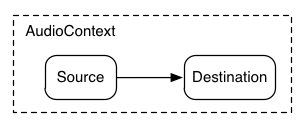
var ctx = new window.webkitAudioContext();

function playSound(arrayBuffer) { // Obtain arrayBuffer from XHR2.
  ctx.decodeAudioData(arrayBuffer, function(buffer) {
    var src = ctx.createBufferSource();
    src.buffer = buffer;
    src.loop = false;
    src.connect(ctx.destination);
    src.noteOn(0); // Play immediately.
  }, function(e) {
    console.log(e);
  });
}
Shoot:
<audio> node.
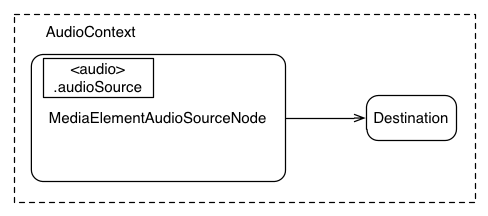
    var context = new webkitAudioContext();

    function setupStreamingAudio() {
      var audioTag = document.getElementById('audioTagID');
      audioTag.audioSource.connect(context.destination);
    }
  var ctx = new webkitAudioContext();

  src = ctx.createJavaScriptNode(1024, 1, 1);
  src.onaudioprocess = function(e) { computeWave(e); }
  src.connect(ctx.destination);

  var sample_count = 0;
  computeWave = function (e) {
    var data = e.outputBuffer.getChannelData(0);
    for (var i = 0; i < data.length; ++i) {
      data[i] = Math.sin(sample_count++);
    }
  }
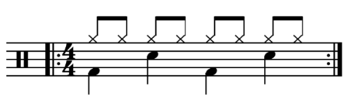
  // Play the bass (kick) drum on beats 1, 5
  playSound(kick, time);
  playSound(kick, time + 4 * eighthNoteTime);

  // Play the snare drum on beats 3, 7
  playSound(snare, time + 2 * eighthNoteTime);
  playSound(snare, time + 6 * eighthNoteTime);

  // Play the hi-hat every eighthh note.
  for (var i = 0; i < 8; ++i) {
    playSound(hihat, time + i * eighthNoteTime);
  }
function playSound(buffer, time) {
  var source = context.createBufferSource();
  source.buffer = buffer;
  source.connect(context.destination);
  source.noteOn(time);
}
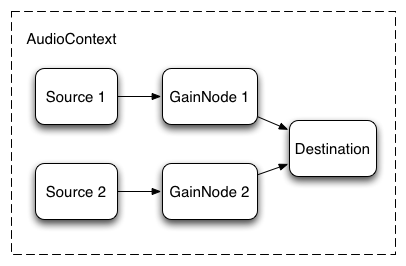
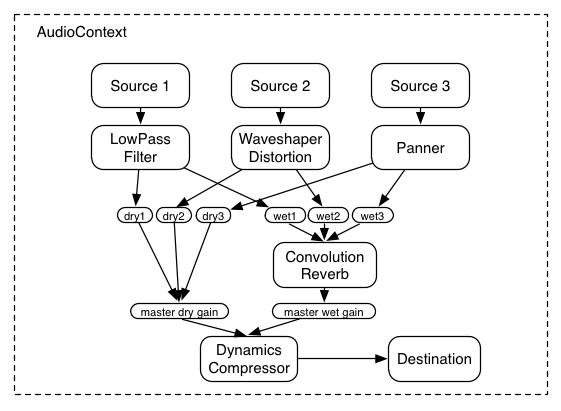
  var source = context.createBufferSource();
  var gainNode = context.createGainNode();
  source.buffer = buffer;
  source.connect(gainNode);
  gainNode.connect(context.destination);
Drums Organ
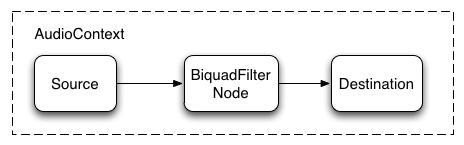 BiquadAudioNode filter
     // Connect dry mix
     source.connect(panner);
     panner.connect(dryGainNode);
     dryGainNode.connect(masterGainNode);

     // Connect wet mix
     panner.connect(convolver);
     convolver.connect(wetGainNode);
     wetGainNode.connect(masterGainNode);

     // Connect master gain
     masterGainNode.connect(context.destination);
Doppler Effect Demo
crbug.com/72754 (filed 2/11/11)
    element.lockMouse();
    element.unlockMouse();
    element.setMousePosition(x,y);
Pepper API sample: ppapi/examples/mouse_lock
document.addEventListener("click", function (e) {
  if (e._isSynthetic)
    return;
  // send a synthetic click
  var ee = document.createEvent("MouseEvents");
  ee._isSynthetic = true;
  x = myCursor.x;
  y = myCursor.y;
  ee.initMouseEvent("click", true, true, null, 1,
                    x + e.screenX - e.clientX,
                    y + e.screenY - e.clientY,
                    x,
                    y);
  var target = document.elementFromPoint(x, y)
  if (target)
    target.dispatchEvent(ee)
});
Among other things:
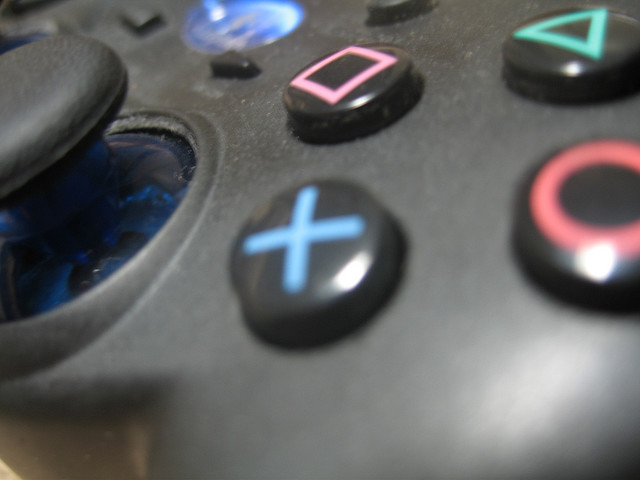
Supported in Mozilla nightlies
function runAnimation() {
    window.requestAnimationFrame(runAnimation);

    for (var i = 0; i < navigator.gamepads.length; ++i) {
        var pad = navigator.gamepads[i];
        // todo; simple demo of displaying pad.axes and pad.buttons
    }
}

window.requestAnimationFrame(runAnimation);

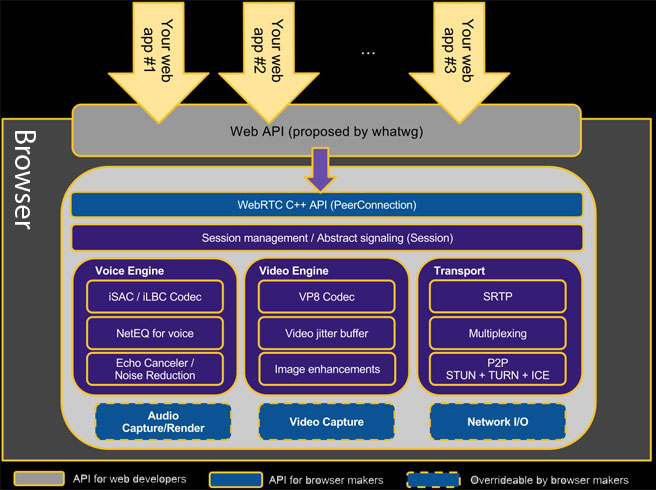
high quality real-time voice/video communication in the browser